- Project Name
Cell Sandbox — A Visual Playground for the CKB Cell Model - Team / Individual Profile and Contact Information
-
Name: zynorr
-
Role: Sole developer and maintainer
-
Background: Full-stack engineer with deep experience in TypeScript, React, Next.js, and the CKB ecosystem. Built the entire Cell Sandbox
-
github: zynorr (zynor) · GitHub
email : [email protected]
Telegram @zynorlawesProject Descr@zynorlawesption
Problem
CKB’s Cell model is one of the most powerful parts of the Nervos architecture, but it is also one of the hardest concepts for new developers to understand.A developer learning CKB needs to understand several concepts at once:
-
Cells as state containers
-
Capacity as a first-class resource
-
Lock scripts and ownership
-
Type scripts and state constraints
-
Cell data encoding
-
Inputs and outputs in a transaction
-
Cell deps and script execution context
-
Wallet signing and testnet broadcasting
Today, much of this learning happens through documentation, SDK examples, explorers, and trial-and-error. This creates a high onboarding barrier. New developers often need to read several resources before they can confidently answer simple questions like:
-
What does a Cell contain?
-
What is the difference between an input Cell and an output Cell?
-
How does a transaction consume old Cells and create new Cells?
-
How do lock scripts and type scripts appear inside a real transaction?
-
How does a Cell configuration map back to code?
The current Cell Sandbox MVP already makes Cells more visual and interactive. However, based on Spark Program committee feedback, the current demo still needs refinement. Even experienced CKB developers can find the interface confusing, and newcomers may not immediately know where to start, which module to use, or how to connect what they see on screen to the actual Cell model.
For Cell Sandbox to become a strong educational tool, it must not only expose CKB concepts visually; it must guide developers through them clearly.
Solution
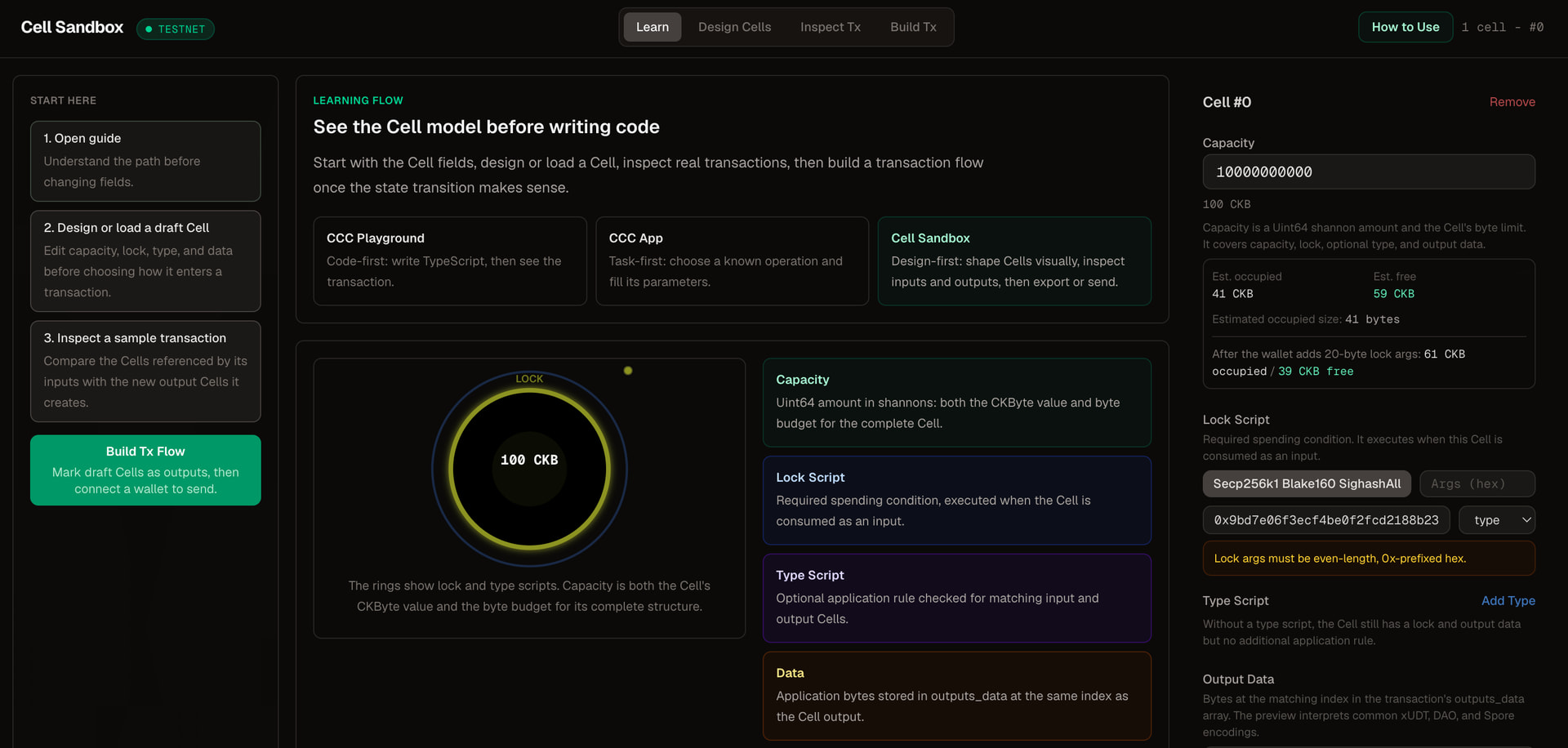
Cell Sandbox is a browser-based visual learning and prototyping environment for the CKB Cell model.The goal is to help developers understand Cells and transactions by interacting with them visually instead of starting directly from code.
The current MVP already allows users to:
-
Design Cells using visual form fields
-
Edit capacity, lock scripts, type scripts, and data
-
View Cell structure as SVG diagrams
-
Assemble Cells into transactions
-
Estimate capacity and fees
-
Connect JoyID wallet
-
Broadcast transactions to testnet
-
Load Cells from chain by outpoint
-
Export CCC-compatible TypeScript code
-
Switch between Pudge testnet and mainnet
-
Share validated Cell configurations through URLs
The next Spark phase will refine the MVP into a clearer educational tool focused on three priorities requested by the committee:
-
Usability
-
Feature completeness
-
UI/UX interaction
Instead of mainly adding more templates or growth metrics, this refined proposal focuses on making the existing tool easier to understand, more complete for real CKB transaction learning, and more accessible to developers using different wallets.
The main improvements will be:
-
Reorganizing the app into a clearer guided learning flow
-
Adding prominent in-app usage guides
-
Improving labels, empty states, explanations, and error messages
-
Supporting both input and output Cell display after entering a transaction hash
-
Integrating
@ckb-ccc/connector-reactto support a wider range of wallet connections -
Improving the UI/UX so the demo feels less confusing and more like a structured educational sandbox
The intended outcome is that a developer can open Cell Sandbox and quickly understand the Cell model by seeing, loading, inspecting, and interacting with real CKB Cells and transactions.
Current MVP Status
The MVP is already live and functional.
Current functionality includes:
-
Visual Cell designer with capacity, lock script, type script, and data editing
-
Known script registry including Secp256k1, Omnilock, xUDT, Spore, DAO, Cheque, Type ID, and Always Success patterns
-
Cell templates for token, NFT, DAO, authentication, and demo patterns
-
SVG Cell visualization with color-coded structure
-
Data editor with hex, text, and number modes
-
Auto-parsed preview for supported data patterns such as xUDT amounts, DAO blocks, and Spore content
-
Transaction flow builder using React Flow
-
Input/output assignment inside the transaction builder
-
Balance tracking and fee estimation
-
JoyID wallet integration
-
Testnet faucet claiming with status polling
-
Cell loading from chain by outpoint
-
CCC-compatible TypeScript code export
-
Zod-validated shareable URLs
-
Network switching between Pudge testnet and mainnet
-
14 passing tests and zero type errors
Repository: GitHub - zynorr/cell-sandbox · GitHub
How this differs from existing CKB tools
-
CCC already ships two visual applications: live.ckbccc.com and app.ckbccc.com
Cell Sandbox occupies a different niche:
CCC Playground = code-first. Write TypeScript, see the resulting transaction.
CCC App = task-first. Select a pre-built operation (e.g., “Send xUDT”), fill parameters.
Cell Sandbox = free-form design. Design any cell from scratch by filling fields in a visual form, assemble cells into a transaction with drag-and-drop, visualize the structure as SVG, and export back to CCC-compatible code.
Cell Sandbox fills the “blank canvas” gap it’s for learning and prototyping when you don’t yet know what you want to build, or when you want to understand how a cell configuration maps to a real transaction before writing any code.
Revised Phase Focus
The committee feedback made it clear that the next phase should focus on making Cell Sandbox an excellent educational tool, not simply a larger feature set.
The revised Spark phase will therefore focus on:
-
Making the tool easier to use
-
Making the transaction model more complete
-
Improving the UI/UX and learning experience
-
Supporting more wallet connection options
-
Making tutorials and usage guidance visible inside the app
The project will be scoped around refinement and completeness rather than broad expansion.
Area 1: Usability Improvements
Current issue
The current demo exposes many useful features, but the module structure is not yet clear enough for first-time users. A newcomer may not know whether to begin by designing a Cell, loading a Cell, building a transaction, connecting a wallet, or exporting code.
This weakens the educational value of the tool.
Planned improvement
The app will be reorganized around a clearer guided flow:
-
Learn what a Cell is
-
Design or load a Cell
-
Inspect capacity, lock script, type script, and data
-
Load or build a transaction
-
Compare input Cells and output Cells
-
Connect a wallet
-
Broadcast or inspect a transaction
-
Export CCC-compatible code
Implementation details
The usability work will include:
-
A visible “How to Use” entry point in the main interface
-
A guided first-use panel for new users
-
Clearer section names and module grouping
-
Better empty states explaining what to do next
-
Inline explanations for core concepts
-
Short descriptions beside technical fields
-
Tooltips or helper text for capacity, lock scripts, type scripts, data, inputs, outputs, and Cell deps
-
A simple example path that users can follow without prior CKB knowledge
Expected result
A new developer should be able to open Cell Sandbox and understand the first useful action within the first minute.
The experience should feel less like a raw developer demo and more like a guided educational sandbox.
Area 2: Feature Completeness
Current issue
The current demo focuses heavily on designing and displaying output Cells. However, a complete CKB transaction depends on both:
-
Input Cells consumed by the transaction
-
Output Cells created by the transaction
Displaying only output Cells gives an incomplete picture of how CKB transactions work.
Planned improvement: input and output Cell display from tx hash
Cell Sandbox will add support for loading a transaction by transaction hash and displaying both input and output Cells.
A user will be able to paste a Pudge testnet transaction hash and inspect:
-
The input Cells consumed by the transaction
-
The output Cells created by the transaction
-
The capacity values
-
Lock scripts
-
Type scripts
-
Data fields
-
Transaction structure
-
Explorer link for verification
Implementation details
The transaction loader will include:
-
A tx hash input field
-
Fetching transaction details from Pudge testnet
-
Resolving consumed input Cells where possible
-
Rendering input Cells and output Cells separately
-
Clear visual labels for “Inputs” and “Outputs”
-
Explorer links for the loaded transaction
-
Helpful errors when a tx hash is invalid, unavailable, or unsupported
Expected result
This will make Cell Sandbox more complete as an educational tool.
Instead of only showing what a user creates, it will also show how real CKB transactions consume existing Cells and generate new ones. This directly teaches the core mental model of CKB.
Area 3: Wider Wallet Connection Support
Current issue
The current demo only supports JoyID wallet connection. This limits the number of developers who can try the full transaction experience.
Planned improvement
Cell Sandbox will integrate @ckb-ccc/connector-react to support broader wallet connection options through the CCC ecosystem.
Implementation details
The wallet work will include:
-
Adding
@ckb-ccc/connector-react -
Refactoring the wallet connection flow to use the CCC connector interface
-
Preserving JoyID support where possible
-
Adding support for other available CCC-compatible wallet connectors
-
Improving wallet connection states
-
Displaying clear messages when no compatible wallet is available
-
Handling connection, disconnection, unsupported network, and signing errors more clearly
Expected result
Developers will not be limited to JoyID only. They will be able to connect using their preferred supported wallet option, making the tool easier to access and more useful for the wider CKB developer community.
Area 4: UI/UX Refinement
Current issue
The current UI is functional but can be confusing. The user must understand too much before the interface becomes useful.
Planned improvement
The UI will be refined around clarity, learning, and guided interaction.
Area 5: Documentation and Learning Support
Current issue
The existing documentation explains the project, but users need guidance directly where confusion happens: inside the app.
Planned improvement
Cell Sandbox will include both in-app and external learning support.
Deliverables
The documentation work will include:
-
In-app “How to Use” guide
-
Short written walkthrough
-
Updated README
-
Example transaction inspection guide
-
Screenshots or diagrams showing input and output Cell flow
-
Explanation of how Cell Sandbox relates to CCC tools
-
Known limitations section
Expected result
When developers are confused, they should not need to search through external documentation first. They should be able to open help from inside the project and continue learning without leaving the flow.
Expected Deliverables
1. Guided Usability Flow
Reorganize the project into a clearer educational flow.
Includes:
-
Improved module organization
-
Visible “How to Use” guide
-
First-use guidance for newcomers
-
Inline explanations for key CKB concepts
-
Better empty states and next-step prompts
2. Input and Output Cell Display
Add support for loading a transaction by tx hash and displaying both input and output Cells.
Includes:
-
Tx hash input
-
Transaction loading from Pudge testnet
-
Input Cell rendering
-
Output Cell rendering
-
Clear labels distinguishing consumed Cells from created Cells
-
Explorer links for verification
-
Helpful error states
3. Wider Wallet Support
Integrate @ckb-ccc/connector-react.
Includes:
-
Broader wallet connector support
-
Improved wallet connection UI
-
Clear connection/disconnection states
-
Better unsupported wallet and network messaging
-
Continued support for the existing wallet flow where compatible
4. UI/UX Polish
The current Cell Sandbox MVP is functional, but the interface still feels like a raw tool surface. New users can see many actions at once, such as creating Cells, loading by outpoint, opening templates, switching to Tx Flow, exporting code, and connecting JoyID, but the app does not clearly explain where to start or how these actions relate to the CKB Cell model.
This phase will reorganize the interface into a clearer educational workflow.
The revised UI will be structured around four modes:
1**. Learn**
A short in-app guide explaining Cells, capacity, lock scripts, type scripts, data, inputs, and outputs.
-
Design Cells
A clearer version of the existing Cell designer, with the visual Cell canvas at the center and an inspector for capacity, lock script, type script, and data. -
Inspect Tx
A transaction inspection view where users can paste a Pudge tx hash and see both **Input Cells Consumed** and **Output Cells Created**.
4**. Build Tx**
The existing transaction builder, positioned after users understand how Cells and transactions work.
Planned UI/UX work includes:
- Adding a visible Start here/ Guide entry point in the first screen
- Separating Cell design from transaction inspection
- Replacing vague transaction loading with a dedicated tx hash inspection screen
- Showing input Cells and output Cells side by side
- Adding short helper text for capacity, lock scripts, type scripts, data, and Cell deps
- Moving wallet status into a clearer wallet connection area
- Supporting connector-based wallet selection through `@ckb-ccc/connector-react`
- Adding useful empty, loading, invalid hash, and partially resolved transaction states
- Improving mobile layout with Learn / Design / Tx / Wallet tabs
- Keeping raw technical fields available for advanced users while making the first-use path clearer
A design draft has been prepared to make this work reviewable before implementation. It includes:
- Current live UI audit
- current vs proposed main workspace
- Transaction inspection screen
- Input Cells Consumed vs Output Cells Created view
- Wallet connector flow
- Loading and error states
- Mobile layout
Design artifact:
-design image: cell-sandbox/docs/cell-sandbox-ui-ux.png at main · zynorr/cell-sandbox · GitHub
5. Documentation and Tutorial Updates
Add usage support inside and outside the app.
Includes:
-
In-app guide
-
Updated README
-
Written walkthrough
-
Example tx hash guide
-
Screenshots or diagrams
-
Final report
How to Verify
All deliverables will be verifiable through the live demo, repository, README, and Pudge testnet explorer.
1. Guided Usability Flow
Reviewer steps:
-
Open the live demo.
-
Confirm there is a prominent “How to Use” or guide entry point.
-
Confirm the app provides a clearer path for designing/loading Cells, inspecting transactions, connecting wallets, and exporting code.
-
Confirm empty states and helper text explain what the user should do next.
Verification proof:
-
Updated live demo
-
README screenshots
-
In-app guide available in the UI
2. Input and Output Cell Display
Reviewer steps:
-
Open the transaction loader in Cell Sandbox.
-
Paste the provided Pudge testnet transaction hash from the README.
-
Confirm the app displays both input Cells and output Cells.
-
Confirm input Cells and output Cells are clearly labeled.
-
Open the linked transaction in the Nervos explorer and verify the transaction data.
Verification proof:
-
Example tx hash in README
-
Explorer link in README
-
Input/output Cell display in the live demo
3. Wider Wallet Support
Reviewer steps:
-
Open the wallet connection interface.
-
Confirm that wallet support is not limited to JoyID only.
-
Confirm wallet options are exposed through the CCC connector flow.
-
Test connection with an available supported wallet.
-
Confirm unsupported wallet or connection failure states are handled clearly.
Verification proof:
-
Updated wallet connection UI
-
Code integration using
@ckb-ccc/connector-react -
README notes on supported wallet flow
4. UI/UX Refinement
Reviewer steps:
-
Open the live demo.
-
Review the updated layout.
-
Confirm the main modules are easier to understand.
-
Confirm input/output Cell visualization is clearer.
-
Confirm loading, empty, and error states are present.
-
Test on desktop and mobile viewport.
Verification proof:
-
Updated live demo
-
Screenshots in README or final report
-
Responsive layout improvements in the repository
5. Documentation
Reviewer steps:
-
Open the README.
-
Confirm it explains the revised project flow.
-
Confirm it includes an example tx hash.
-
Confirm it explains input and output Cells.
-
Confirm the app includes prominent help content.
Verification proof:
-
Updated README
-
In-app guide
-
Written walkthrough
-
Final report
Required Funding
Total request: $750
This revised request narrows the Spark phase toward usability, feature completeness, and UI/UX refinement.
This budget reflects a focused improvement phase rather than a broad feature expansion phase.
Budget Breakdown
Development and UI/UX Refinement — $600
Covers implementation of:
-
Guided usability flow
-
Module reorganization
-
In-app usage guide
-
Inline educational explanations
-
Transaction loading by tx hash
-
Input and output Cell display
-
@ckb-ccc/connector-reactintegration -
Wallet connection UI improvements
-
Error/loading/empty state improvements
-
Responsive UI polish
-
README updates
-
Testing and final cleanup
Documentation and Final Report — $150
Covers:
-
Written walkthrough
-
Updated README
-
Example transaction inspection guide
-
Screenshots or diagrams
-
Final report preparation
-
Summary of completed usability, feature completeness, and UI/UX improvements
Milestones
Milestone 1 — Usability and Educational Flow
Timeline: Weeks 1–2
Goal: Make the app easier to understand and easier to use for new developers.
Tasks:
-
Reorganize the main app flow around learning and inspection
-
Add a prominent in-app “How to Use” guide
-
Add inline explanations for core Cell model concepts
-
Improve empty states and next-step prompts
-
Improve labels around capacity, lock scripts, type scripts, data, inputs, outputs, and Cell deps
-
Update README with the revised learning flow
Completion criteria:
-
Live demo has a clearer guided flow
-
“How to Use” guide is visible in the interface
-
New users are guided toward the first useful action
-
README reflects the new app structure
Milestone 2 — Input and Output Cell Transaction Viewer
Timeline: Weeks 3–4
Goal: Make Cell Sandbox more complete by showing both sides of a CKB transaction.
Tasks:
-
Add transaction hash input
-
Fetch transaction data from Pudge testnet
-
Resolve and display input Cells
-
Display output Cells
-
Clearly distinguish consumed Cells from created Cells
-
Add explorer links
-
Add useful error messages for invalid or unsupported tx hashes
-
Add example tx hash to README
Completion criteria:
-
Reviewer can paste a tx hash and inspect both input and output Cells
-
Input and output Cells are clearly labeled
-
README includes a reproducible example
-
Explorer link confirms the transaction
Milestone 3 — Wallet Support and UI/UX Polish
Timeline: Weeks 5–6
Goal: Improve accessibility and finish the demo as a polished educational tool.
Tasks:
-
Integrate
@ckb-ccc/connector-react -
Add broader wallet connection support
-
Improve wallet connection UI and states
-
Improve loading, error, and unsupported-wallet messages
-
Polish layout and responsive behavior
-
Improve transaction visualization clarity
-
Final testing and cleanup
-
Prepare final report
Completion criteria:
-
Wallet connection is not limited to JoyID only
-
App has clearer wallet states
-
UI is easier to navigate
-
Final report is submitted with screenshots, links, and summary of completed work
Estimated Completion Time
6 weeks
The work is achievable in this timeframe because the MVP architecture, core components, transaction builder, wallet flow, deployment pipeline, and repository are already in place.
The Spark phase will refine and extend existing systems rather than building the product from scratch.
Clear To-do List
Weeks 1–2: Usability
-
Reorganize modules into a clearer learning flow
-
Add in-app “How to Use” guide
-
Add inline helper text for CKB concepts
-
Improve labels and empty states
-
Improve README usage flow
Weeks 3–4: Feature Completeness
-
Add tx hash loader
-
Fetch transaction details from Pudge testnet
-
Display input Cells
-
Display output Cells
-
Add explorer links
-
Add example tx hash to README
-
Improve transaction loading error states
Weeks 5–6: Wallet and UI/UX Polish
-
Integrate
@ckb-ccc/connector-react -
Add broader wallet connection options
-
Improve wallet connection UI
-
Improve loading and error states
-
Polish responsive layout
-
Improve transaction visualization
-
Prepare final report
Relevance to the CKB Ecosystem
Cell Sandbox addresses a real onboarding problem in the CKB ecosystem.
The Cell model is central to CKB, but it is unfamiliar to many developers coming from account-based blockchains. A developer may understand smart contracts on EVM but still struggle to understand how CKB represents state, ownership, and transitions through Cells.
Cell Sandbox helps solve this by making the Cell model visible and interactive.
Developer onboarding
A new developer can use Cell Sandbox to:
-
See the structure of a Cell
-
Understand capacity
-
Inspect lock scripts and type scripts
-
Load real transactions
-
Compare input and output Cells
-
Understand how transactions consume and create state
-
Connect a wallet
-
Export CCC-compatible TypeScript code
This lowers the learning barrier and creates a more practical path from concept to code.
Educational value
The revised project focus is directly aligned with the committee’s feedback: making Cell Sandbox an excellent educational tool.
Instead of only showing forms and diagrams, the improved version will guide developers through the concepts step by step. The app will explain what the user is seeing, what to do next, and how each part connects to the real CKB transaction model.
Technical alignment
Cell Sandbox uses CKB’s architecture directly:
-
Cells as programmable state
-
Capacity as an explicit resource
-
Lock scripts for ownership
-
Type scripts for constraints
-
Inputs and outputs as the basis of transaction state transitions
-
CCC-compatible code export
-
CCC wallet connector integration
-
Pudge testnet verification
This makes the project not only a learning tool, but also a practical reference for how modern CKB frontend tooling can be built.
Relationship to CCC
Cell Sandbox complements CCC rather than competing with it.
CCC provides strong SDK tooling, a code-first playground, and task-first demos. Cell Sandbox adds a design-first layer that helps developers understand the Cell model visually before moving into code.
The flow is:
Visual learning → Cell design → transaction inspection → CCC-compatible code
This makes Cell Sandbox a bridge between conceptual onboarding and real CKB development.
Reporting Approach
The committee has clarified that hard reporting metrics are less important than usability, feature completeness, and UI/UX quality.
The final report will therefore focus on the quality of the refinement work.
The report will include:
-
Summary of usability improvements completed
-
Before/after screenshots of the interface
-
Link to the updated live demo
-
Link to the updated repository
-
Example Pudge testnet tx hash used for input/output Cell inspection
-
Explanation of the input/output Cell viewer
-
Wallet connector integration summary
-
Documentation and in-app guide links
-
Known limitations
-
Future improvement ideas
-
Any available usage data from Vercel Analytics or anonymous app events, if available
Possible usage data may include:
-
Unique visitors
-
Number of transaction hashes inspected
-
Number of template loads
-
Number of wallet connection attempts
-
Number of testnet transactions broadcast through the tool
These metrics will be treated as supporting context, not the main success condition.
The main success condition is whether Cell Sandbox becomes clearer, more complete, and more useful as an educational tool for understanding the CKB Cell model.
Final Outcome
At the end of this Spark phase, Cell Sandbox should be a more polished and complete educational sandbox for CKB developers.
A reviewer or new developer should be able to:
-
Open the live demo
-
Understand where to start
-
Read a visible usage guide
-
Design or inspect a Cell
-
Load a real transaction by tx hash
-
View both input and output Cells
-
Understand how Cells move through a transaction
-
Connect using a broader CCC wallet flow
-
Export CCC-compatible code
-
Use the project as a practical learning tool for the CKB Cell model
This refined scope directly addresses the committee’s feedback and focuses the $750 Spark budget on making Cell Sandbox an excellent educational tool for the CKB ecosystem.
- Try the live demo: https://cell-sandbox-m.vercel.app/
Repository: GitHub - zynorr/cell-sandbox · GitHub