Fiber Manager is a browser extension for managing and debugging Fiber nodes from a browser-based workspace. After the extension is loaded, click the extension icon in the browser toolbar to open the management workspace.
The plugin is still in an early development stage. It is suitable for development, integration testing, and debugging. It is not intended to be used as a production wallet or an end-user fund management tool.
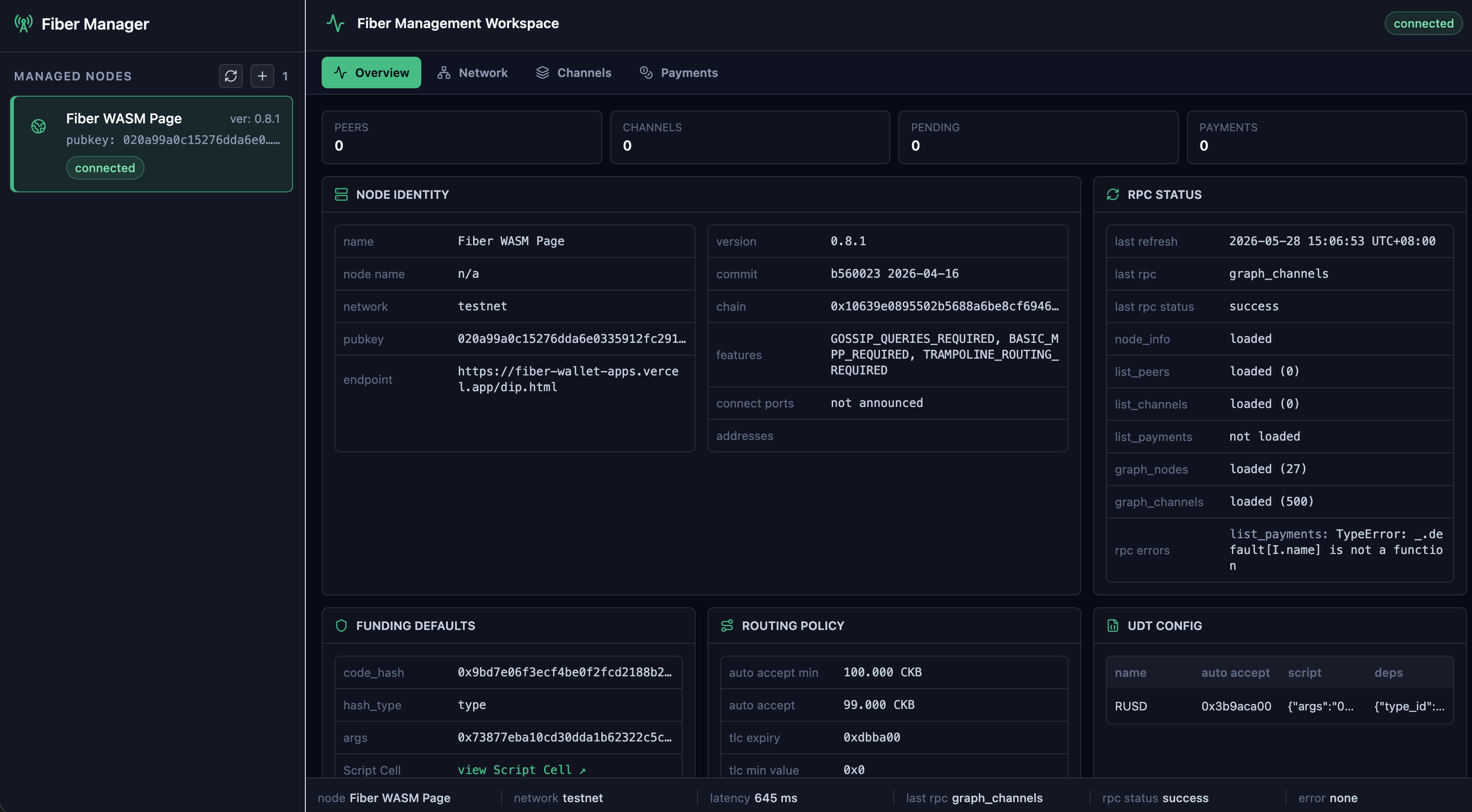
Core Features
-
Manage multiple Fiber node configurations, including node order and the active node.
-
Support two node sources: direct JSON-RPC nodes and Fiber WASM nodes running in browser pages.
-
Connect to Fiber nodes running on the Web through the Fiber WASM API exposed by an open page.
-
Refresh and display node status, latency, public key, network, latest block, and sync status.
-
Read data from
node_info,list_peers,list_channels,list_payments,graph_nodes, andgraph_channels. -
Provide entry points for Peer, Channel, Payment, and Invoice operations.
-
Store locally created invoice history for each node.
Local Development
The plugin has not been published to a browser extension store yet. To use it, build it locally and load it into the browser manually.
Common commands:
-
pnpm install: install dependencies. -
pnpm dev: start the Chrome / Chromium development environment. -
pnpm build: build the Chrome / Chromium extension for manual loading.
Build output is written under dist/, for example dist/chrome-mv3.
Load the Extension (Chrome)
-
Run
pnpm build. -
Open
chrome://extensions. -
Enable Developer mode.
-
Click Load unpacked.
-
Select
dist/chrome-mv3. -
Click the extension icon to open Fiber Manager.
Connect Nodes
Reorder Nodes
To change the order of added nodes, drag the icon on the left side of a node card up or down. The node list order is saved automatically.
RPC Node
RPC mode sends requests to a Fiber node through its JSON-RPC endpoint. The default endpoint is:
http://127.0.0.1:8227
When adding an RPC node, fill in:
-
Name: the display name of the node. -
Network: the node network, such asmainnet,testnet, ordevnet. -
RPC endpoint: the Fiber JSON-RPC service URL.
If the browser blocks requests because of CORS, allow the extension origin in the Fiber node or through a local proxy.
WASM Page Node
WASM mode connects to a Fiber WASM API from an already open browser page.
The default mount point is:
window.fiber
If you are not sure whether the page uses this mount point, open the browser console on that page and run await window.fiber.nodeInfo(); to check whether it returns Fiber node info.
To add a WASM node:
-
Keep the target Fiber WASM page open.
-
Fill in or confirm
Mount point. -
Click the refresh button to scan browser pages.
-
Select the target page from
Target page.
After you select a WASM page node, the plugin connects to the selected page and uses the Fiber interface provided by that page to read node information and execute operations.
Workspace
The workspace contains a node list on the left and feature pages on the right. A typical workflow is:
-
Click
+above the node list to add a node. -
Select
RPCorWASMand complete the configuration. -
Click the refresh button to load node status and read-only RPC data.
-
Use the Network, Channels, and Payments pages to inspect data or run operations.
Main workspace pages:
-
Overview: viewNode Identity,RPC Status,Funding Defaults,Routing Policy, andUDT Config. -
Network: viewConnected Peers,Graph Nodes, andGraph Channels, and use theConnect Peerdialog. -
Channels: viewPending Channel Requests,Channels,Closed Channels, andPending TLCs, and use theOpen Channeldialog. -
Payments: useSend Payment,Payments History,Invoice Workflow,Invoice Lookup, andCreated Invoices.
Supported RPC Operations
The plugin currently wraps the following Fiber RPC methods:
-
Node and network reads:
node_info,list_peers,list_channels,list_payments,graph_nodes,graph_channels. -
Peer operations:
connect_peer,disconnect_peer. -
Channel operations:
open_channel,accept_channel,shutdown_channel. -
Payment and invoice operations:
send_payment,new_invoice,get_payment,parse_invoice,get_invoice,cancel_invoice,settle_invoice. -
BTC / CCH operations:
send_btc,receive_btc,get_cch_order.
Implementation Notes
(This section is mainly for developers or users who want to understand how the plugin works)
Technology Stack
The plugin is built with WXT, React, and TypeScript. Clicking the extension icon opens the manager.html workspace.
WASM Page Integration
For WASM page nodes, the plugin scans current browser tabs, looks for pages with Fiber IndexedDB data, and checks whether the configured mount point provides a callable Fiber API. RPC nodes send snake_case method names directly to the JSON-RPC endpoint. WASM page nodes first try the page object’s invokeCommand, then try snake_case and camelCase method names, and then common call entries such as request, call, and rpc.
Local Storage
The plugin uses browser extension local storage for management state. Main keys:
-
fiber-manager:node-registry: node list, node order, and active node. -
fiber-manager:invoice-history: invoice history grouped by node ID.
Runtime fields such as connection status, latency, latest RPC result, and error messages are reinitialized or refreshed after loading. This avoids treating stale connection state as the current node state.
Browser Permissions
The plugin also requests these browser extension permissions:
-
storage: store node configuration and invoice history. -
tabs: scan open pages and find Fiber WASM pages. -
activeTab: read information about the current active tab. -
scripting: connect to the selected page and call the Fiber WASM API exposed by that page. -
<all_urls>host permission: allow the extension to inspect and call Fiber WASM pages across local, web, and file URLs.
These permissions are used for development and debugging workflows. When using a WASM page node, the target page must remain open. Otherwise, later RPC calls will fail.
Current Limitations
-
The plugin is still a developer preview. UI, data structures, and RPC coverage may change.
-
Node configuration stored in browser local storage is not guaranteed to stay compatible across versions.
-
Some RPC parameters require users to understand the Fiber node API before filling them in.
-
RPC endpoints need to handle browser CORS restrictions.
-
WASM page nodes depend on the target page’s IndexedDB data and exposed Fiber API. Page changes may cause scanning or calls to fail.
-
There is no unit test script configured yet. Run
pnpm compilebefore submitting changes.