From WebLN to Fiber WebLN: Let Websites Request Payments, Not Take Over Wallets
Hi everyone, I’m Sonny.
Over the past few months, I have built several small projects around Fiber Network: from One-click Start Fiber Network and a Fiber dashboard to Chat-and-Pay and an EV charging payment demo.
The more I built, the more often I ran into the same question:
Fiber nodes can already make payments, but how should an ordinary website use one safely?
The most direct answer is to let the web page call the fnn RPC API.
But that means the page needs to know the node address, RPC interface, and node configuration. It may even gain indirect access to credentials or private keys.
If every DApp connects to a Fiber node in its own way, developers also have to answer the same questions again and again:
- What information may a website read?
- Which operations require user confirmation?
- Should a web page be able to initiate a payment directly?
- Where should the node and its keys run?
- How can a user revoke a website’s permission?
- If the user switches to another node implementation, must the DApp be rewritten?
While thinking about these questions, I kept coming back to WebLN in the Bitcoin Lightning Network ecosystem.
What Is WebLN in the Lightning Network?
The Lightning Network enables faster, lower-cost off-chain Bitcoin payments.
But Lightning itself solves the problems of nodes, channels, routing, and payments. It does not automatically define how a web page should connect to a user’s wallet.
Imagine a website that wants to charge a user for reading an article.
Without a shared interface, the website may need to integrate separately with different wallets and nodes:
Website
  ├── Wallet A API
  ├── Wallet B API
  ├── LND API
  ├── Core Lightning API
  └── Other Provider API
Each wallet may have a different connection flow, permission model, and response format.
Another common flow is for the website to create an invoice and ask the user to:
- Copy the invoice.
- Open a Lightning wallet.
- Paste the invoice.
- Confirm the payment.
- Return to the original web page.
The payment itself may take only a few seconds, yet there is no common language between the website and the wallet.
WebLN was created to address this problem.
The official WebLN documentation describes it as a set of specifications and APIs for communication between Lightning applications and client providers. Through a standardized, permissioned interface, an application can ask the user’s Lightning node to send a payment, create an invoice, or return node information.
When the browser has a WebLN-compatible provider, a web page can access:
window.webln
Before using it, the page asks to connect:
await window.webln.enable();
It can then ask the provider to perform different operations:
const info = await window.webln.getInfo();

const invoice = await window.webln.makeInvoice({
  amount: 1000,
  defaultMemo: "Buy an article",
});

const result = await window.webln.sendPayment(paymentRequest);
WebLN also defines methods such as keysend, allowing applications to request payments without an invoice. The WebLN Guide provides more examples of these APIs.
There is one particularly important word here:
Request.
The website is not directly controlling the user’s Lightning node.
It is telling the provider:
- I want to connect to the wallet.
- I want to read node information.
- I want to create an invoice.
- I want to pay this invoice.
- I want to send money to this node.
Whether the request is allowed, whether it requires confirmation, and which wallet or node ultimately executes it are decisions made by the provider.
The flow looks roughly like this:
Web Page
    ↓
window.webln
    ↓
WebLN Provider
    ↓
User Permission
    ↓
Lightning Wallet / Node
The provider might be a browser extension, an in-app browser inside a wallet, or an interface to a Lightning node operated by the user.
The website does not need to know the implementation behind the wallet. From its perspective, it only needs to know:
await window.webln.sendPayment(invoice);
This is what I find most compelling about WebLN.
It is not merely a JavaScript wrapper around a few RPC methods. More importantly, it establishes a boundary between a website and the user’s wallet:
A website may request a payment, but the user remains in control.
From Lightning WebLN Back to Fiber Network
Fiber Network and the Lightning Network share many similar use cases.
Both involve nodes, peers, payment channels, invoices, routing, and off-chain payments.
Fiber already exposes the relevant RPC methods. Developers can use fnn to create invoices, send payments, inspect channels, or open new ones.
But once those capabilities enter the browser, Fiber faces the same kind of question that WebLN set out to solve:
How should a web page use the user’s Fiber node?
If the page connects directly to fnn RPC, it needs to know where the node is running.
If the node runs inside the browser, where should its keys be stored?
If a website asks to open a channel containing 499 CKB, should the user see a confirmation dialog?
Should reading a balance and sending a payment have the same permission level?
If the user switches from a Fiber node embedded in the browser to a separately operated fnn node, should the DApp have to be rewritten?
These questions are not entirely part of the Fiber protocol itself, but their answers will directly affect whether Fiber can be used safely by web applications.
So I started experimenting with another question:
Could the WebLN provider model be adapted into a browser-facing interface for Fiber Network?
That was the starting point for Fiber WebLN.
What Is Fiber WebLN?
Fiber WebLN exposes a unified provider to the web page:
window.ckbfiber
A DApp does not need to hold the user’s private keys or know how to connect to fnn RPC.
It only needs to request a provider:
import { requestProvider } from "@fiber-webln/client";

const fiber = await requestProvider();

await fiber.enable();

const info = await fiber.getInfo();
const balance = await fiber.getBalance();
To request a payment:
await fiber.keysend({
  destination: peerId,
  amount,
});
To open a channel:
await fiber.openChannel({
  peerId,
  fundingAmount,
});
Fiber WebLN follows ideas similar to Lightning WebLN, but it is not a simple copy of the WebLN interface.
Fiber has its own network model and operational requirements, so the current interface includes methods such as:
enablegetInfogetBalancemakeInvoicesendPaymentgetPaymentkeysendlistChannelsopenChannel
What I wanted to borrow from WebLN was its provider and permission model:
Lightning:

Web Page
    ↓
window.webln
    ↓
WebLN Provider
    ↓
Lightning Node
Fiber:

Web Page
    ↓
window.ckbfiber
    ↓
Fiber WebLN Provider
    ↓
Fiber Node
Both models are trying to express the same principle:
Websites request. Users stay in control.
The web page makes a request, while control remains with the user.
To be clear, Fiber WebLN does not currently claim full compatibility with Lightning WebLN.
It is an experiment that borrows WebLN’s design ideas and extends them for Fiber Network.
How Is It Different From an Ordinary RPC SDK?
When I first started building this project, I asked myself the same question:
Is this just another wrapper around RPC?
I eventually came to see them as solutions to different problems.
An RPC SDK mainly answers:
How can a developer call the node more conveniently?
Fiber WebLN tries to answer:
Who may call the node, does the user need to approve the call, and how much information may the page see?
A Fiber SDK can turn a complicated set of RPC parameters into one method, but it does not normally define:
- Which website made the request.
- Whether that website has permission from the user.
- Which methods may run silently.
- Which operations require explicit confirmation.
- Whether the user is running a local or remote node.
- Whether the web page can access node credentials.
The Fiber WebLN call path looks roughly like this:
Untrusted Web Page
        ↓
Fiber WebLN Client
        ↓
Page Provider
        ↓
Browser Extension
        ↓
Permission / Policy Gate
        ↓
Fiber Provider
        ↓
Fiber Network
The web page can only send standardized requests to the browser extension.
The extension checks the website origin, provider state, and permission policy before deciding whether the request may continue.
For sensitive operations, the extension can display a confirmation window showing the destination node, amount, and operation type. The user then decides whether to approve it.
In that sense, Fiber WebLN creates a trust boundary between the page and the Fiber node.
In one sentence:
Fiber moves the money. Fiber WebLN governs how the web asks.
Fiber moves funds. Fiber WebLN controls how websites request that movement.
Two Providers, One Web Interface
To test whether the interface was genuinely independent of a particular node implementation, I built two different providers:
- Embedded WASM
- Remote fnn
Their node runtimes, key management, and connection paths are different.
From the DApp’s perspective, however, both expose the same API.
Embedded WASM: Running a Fiber Node Inside the Extension
The first provider is Embedded WASM.
It runs a Fiber node based on fiber-js inside the background environment of a Chrome extension.
The user does not need to install or start fnn separately. Once the extension is loaded, the Fiber node can run in the browser.
The flow looks like this:
Web Page
    ↓
Fiber WebLN Extension
    ↓
Embedded fiber-js Node
    ↓
Fiber Network
The node and its keys are isolated from the web page.
The page can request operations through the Fiber WebLN API, but it cannot directly read the private keys held by the extension.
Sensitive operations can also be gated by a passkey and a confirmation window.
This makes Embedded WASM feel somewhat like a lightweight Fiber wallet built into the browser:
- No separately running fnn process is required.
- The Fiber node runs inside the extension.
- Sensitive operations can require user confirmation.
- The web page cannot directly read private keys.
- DApps only need to call the common interface.
Embedded WASM is still a Testnet experiment, however.
It generates separate Fiber and CKB accounts inside the extension and stores sensitive data locally in encrypted form.
The current version does not yet provide a complete implementation of:
- Existing account import
- Key export
- Seed phrase backup
- Cross-device recovery
- Full account migration
If a user already has a CKB wallet, the most practical flow today is to use that wallet to fund the Testnet address generated by the extension.
A more complete future design should allow users to sign on-chain transactions with their existing wallet, or provide a clearly designed account migration and recovery standard. It should not require users to hand an existing private key directly to a browser extension.
Therefore, saying that keys are encrypted and stored locally does not mean the extension already provides production-wallet-level account security.
For now, Embedded WASM primarily tests one idea:
Can a complete Fiber provider run directly inside a browser extension?
Remote fnn: Connecting to a User-Operated Fiber Node
The second provider is Remote fnn.
Instead of running a Fiber node inside the browser, it forwards standardized requests to an fnn node operated separately by the user.
Web Page
    ↓
Fiber WebLN Extension
    ↓
Remote fnn RPC
    ↓
Fiber Network
This mode is more suitable for users who already operate a Fiber node, such as:
- An fnn node in a local development environment
- A Fiber node on a dedicated server
- An always-online payment node
- A node with an existing operations, backup, and monitoring setup
The DApp code does not change:
const fiber = await requestProvider();

await fiber.enable();

const info = await fiber.getInfo();

await fiber.keysend({
  destination: peerId,
  amount,
});
When the provider changes, what changes is where the request ultimately goes and who manages the node and keys.
The DApp does not need to rewrite its payment flow just because the user chooses another node implementation.
This is one of the things I find most interesting about the provider model:
The same website can use completely different Fiber node implementations.
If I Know the IP Address, Can I Connect to Someone Else’s fnn?
Remote fnn raises an important security question.
If I know the IP address of another computer, can I connect directly to its Fiber node?
There are two different kinds of connections to distinguish here.
The first is the Fiber P2P connection.
Fiber nodes use a P2P port to discover and connect to other nodes. This is part of normal protocol operation and does not mean that another peer can directly control your node.
The second is the administrative RPC interface.
Administrative RPC methods can inspect the node, open channels, and send payments. Exposing this interface to the public internet without reliable authentication and access control would indeed be dangerous.
Therefore:
A P2P port may be reachable by other Fiber nodes, but the administrative RPC interface should not be exposed to the entire internet.
The current Remote fnn provider is better suited to setups such as:
- Connecting to
localhost - Accessing a remote fnn through an SSH tunnel
- Operating within a protected private network or VPN
- Placing reliable authentication and access control in front of RPC
The browser confirmation window only controls whether a web page may send a request through the extension.
It cannot replace the security configuration of the remote server itself.
If an fnn RPC endpoint is already exposed publicly without protection, an attacker does not need to go through the Fiber WebLN extension at all.
Remote fnn therefore needs security boundaries at two levels:
Layer 1: Browser Extension Permission
Controls whether a website may request an operation

Layer 2: Remote Node Security
Controls who may connect to the administrative RPC interface
The purpose of this demo is to test the provider model, not to encourage users to expose fnn’s administrative interface directly to the public internet.
Running a Complete Testnet Loop
I wanted the project to be more than an interface definition, so I built a Live Testnet Flow into the website.
It completes four steps:
- Prepare the Fiber provider.
- Fund the CKB address.
- Open a channel with a public node.
- Complete a payment through keysend.
These are real Testnet operations, not front-end simulations.
Step 1: Select and Prepare a Provider
The user first selects a provider:
- Embedded WASM
- Remote fnn
When Embedded WASM is selected, the page uses a green theme. When the user switches to Remote fnn, the flow changes to a different accent color.
This is more than a visual flourish.
The two providers have different trust models, so I want users to be able to see clearly which implementation is active instead of wondering whether the switch worked.
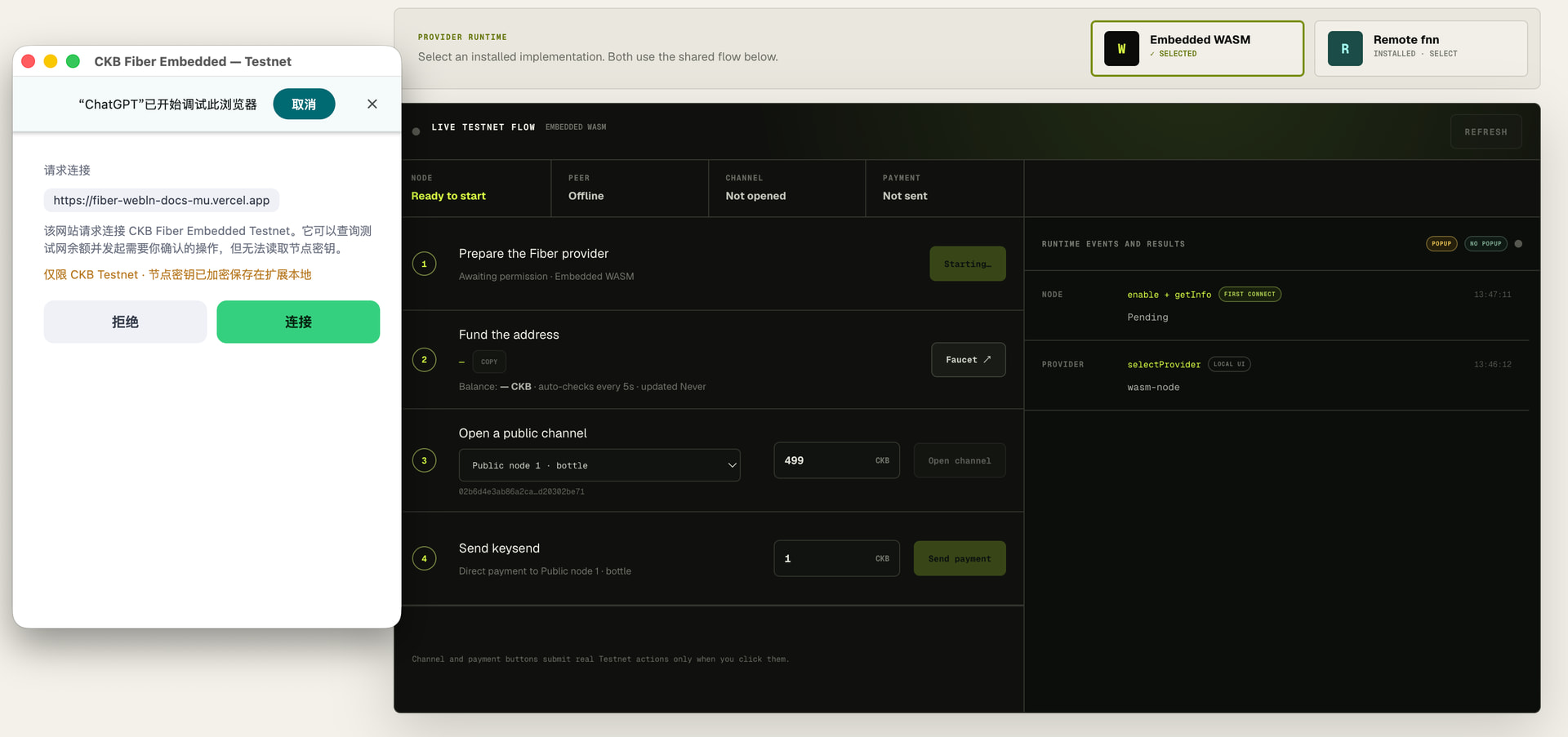
After selection, the page requests a connection through the common interface:
await fiber.enable();
On the first connection, the provider may display an authorization window asking whether the current website should be allowed to access Fiber capabilities.
Step 2: Fund the Address
Once the provider is ready, the page displays its CKB Testnet address and current balance.
The user can copy the address and request test coins from a faucet.
The page checks the balance every few seconds. After the test CKB arrives, the user can continue to open a channel.

Step 3: Open a Channel With a Public Node
The user then selects a public node and enters the channel funding amount.
The demo uses 499 CKB by default.
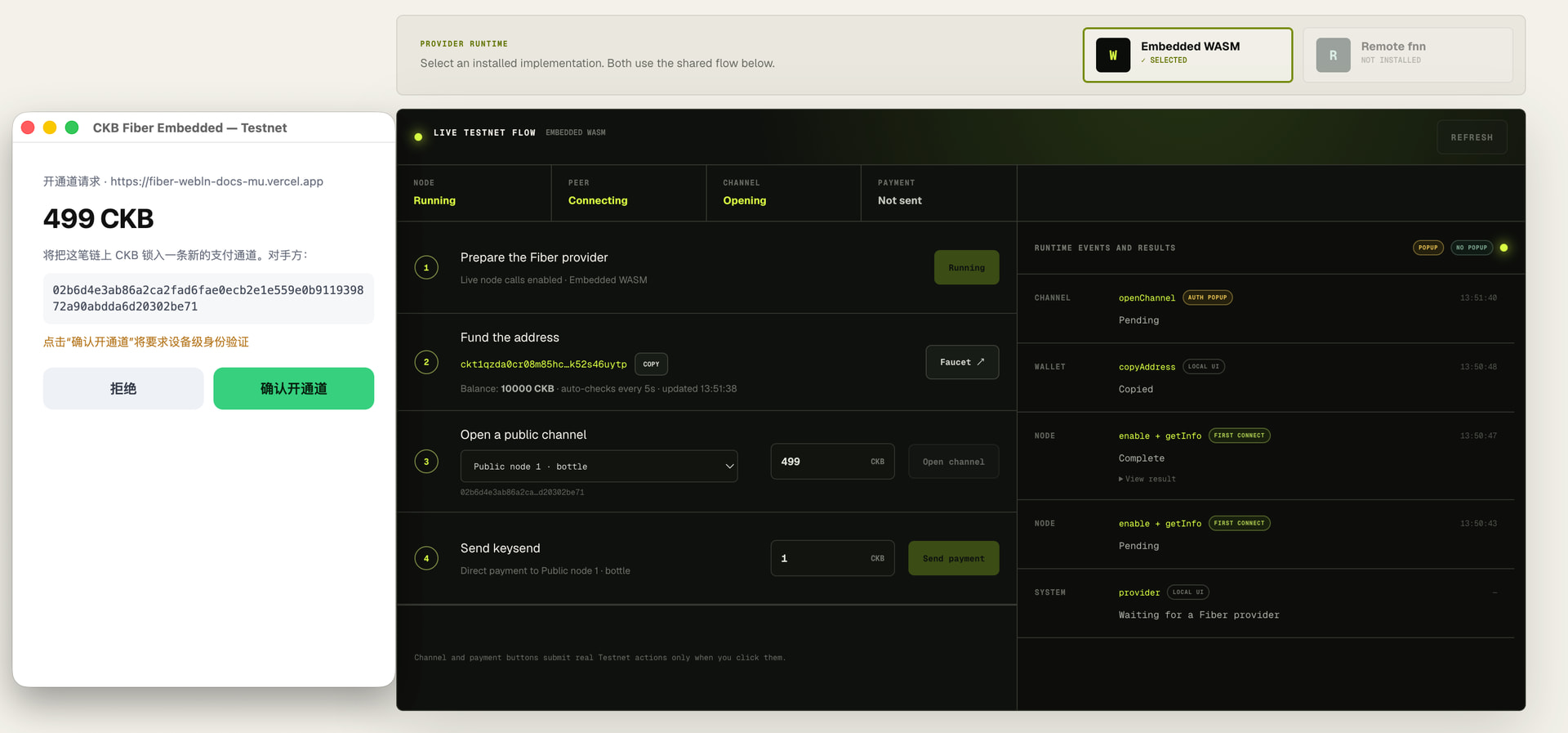
Clicking Open channel does not let the page operate the node directly. Instead, the page sends a request to the provider:
await fiber.openChannel({
  peerId,
  fundingAmount,
});
Opening a channel locks funds and changes node state, so it is treated as a sensitive operation.
The provider displays a confirmation window showing:
- Which website made the request
- Which peer it wants to connect to
- The funding amount
- The fact that it is requesting
openChannel
The request proceeds only after the user confirms it.
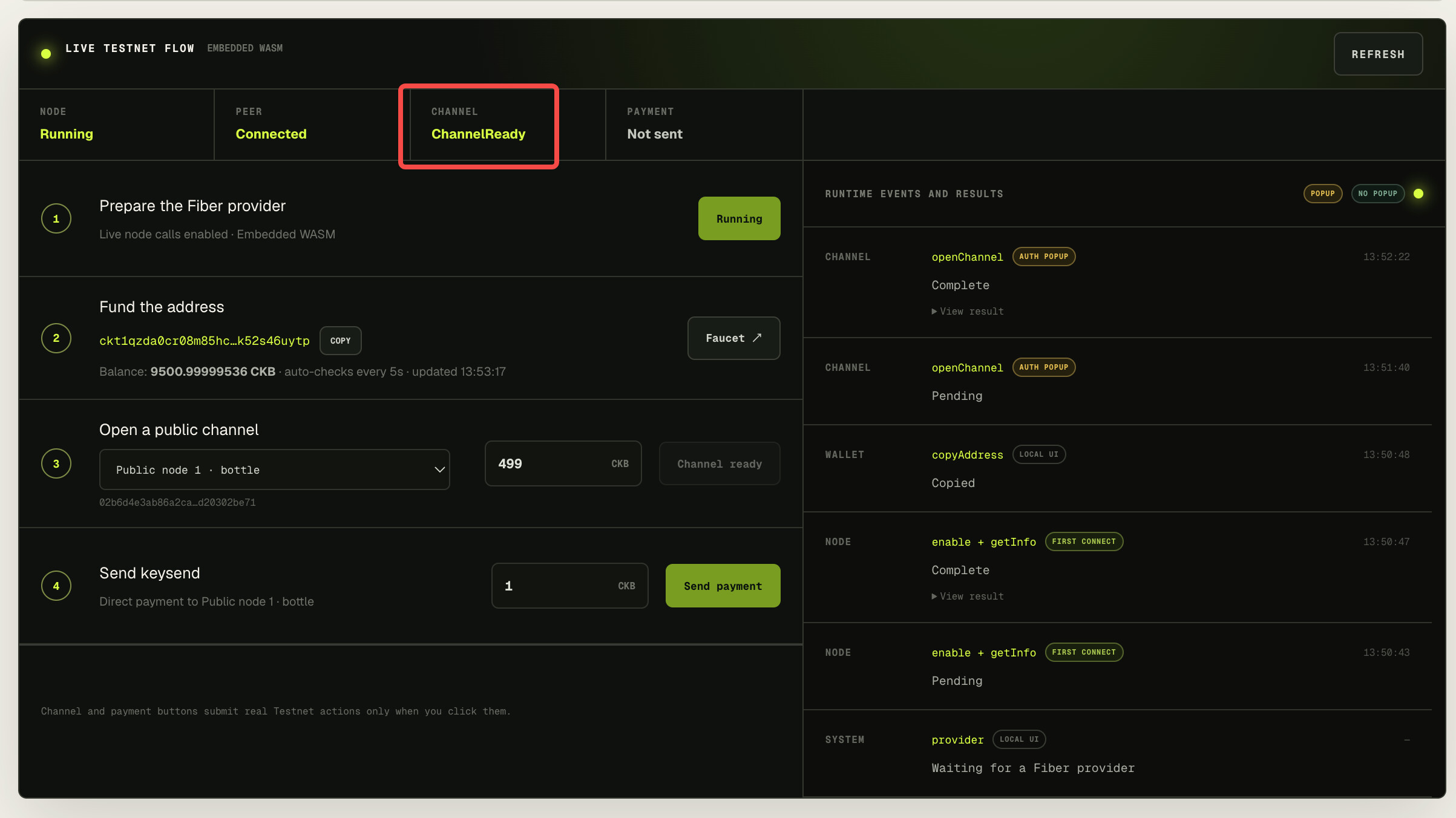
A successfully submitted transaction does not mean the channel is immediately usable.
The page continues polling the channel state until it becomes ready for payments.
Step 4: Send a Keysend Payment
Once the channel is ready, the user can send a keysend payment to the public node.
Unlike an invoice payment, keysend does not require the recipient to create an invoice first.
The sender specifies a destination node and amount and then requests the payment.
In the demo, the user can pay 1 CKB to the selected public node:
await fiber.keysend({
  destination: publicNodeId,
  amount: oneCkb,
});
Because keysend directly affects funds, it also requires user confirmation.
After completion, the page displays:
- Payment hash
- Payment status
- Payment amount
- Fee
- Destination public node
At this point, we have completed an end-to-end flow:
Select Provider
      ↓
Get Testnet CKB
      ↓
Connect to a Public Node
      ↓
Open a Channel
      ↓
Send a Keysend Payment
      ↓
Payment Complete
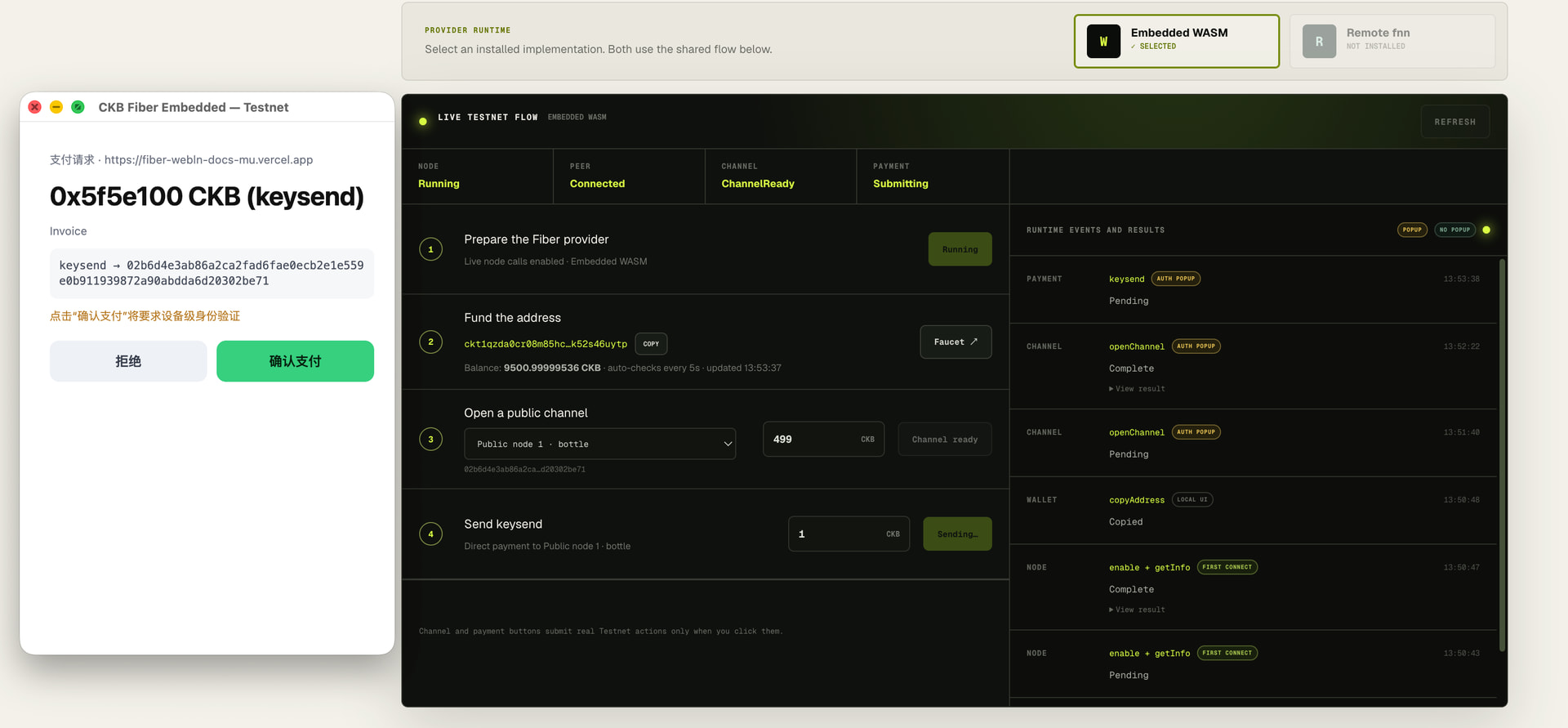
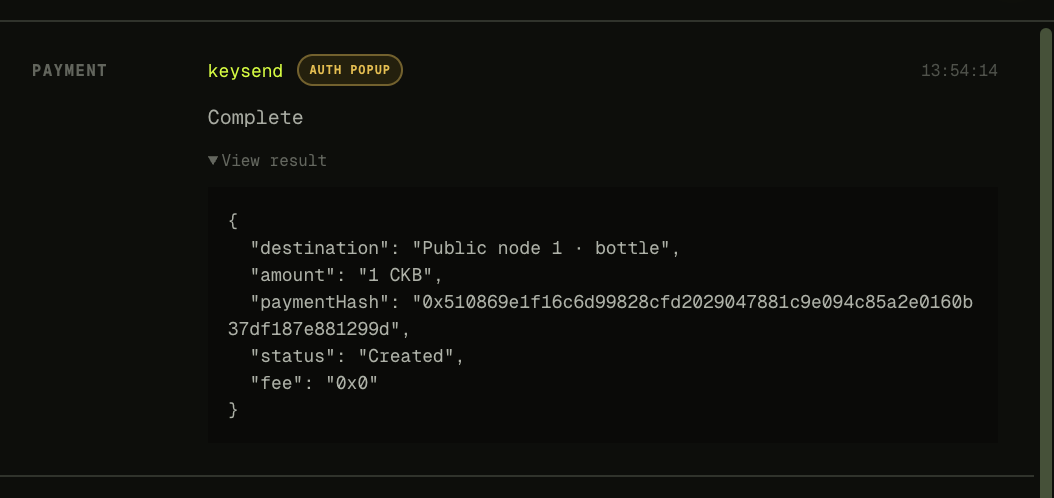
This is the central idea I wanted the demo to validate:
A web page can use one common interface to complete a real Fiber Testnet channel and payment flow without directly accessing private keys.
Which Operations Require an Authorization Popup?
The right side of the demo contains a Runtime Events and Results panel.
In addition to showing the result of each call, it labels the permission category of the operation.
The current demo uses three broad categories.
Local UI
These operations happen entirely within the page interface, for example:
- Switching providers
- Copying an address
- Expanding a result
They do not call the node and do not require an authorization popup.
No Popup
These operations read node state without directly moving funds, for example:
getInfogetBalancelistChannelsgetPayment
They can normally run after the website has received connection permission.
Auth Popup
These operations may change node state or affect funds, for example:
- The first
enable openChannelsendPaymentkeysend
They require explicit user confirmation.
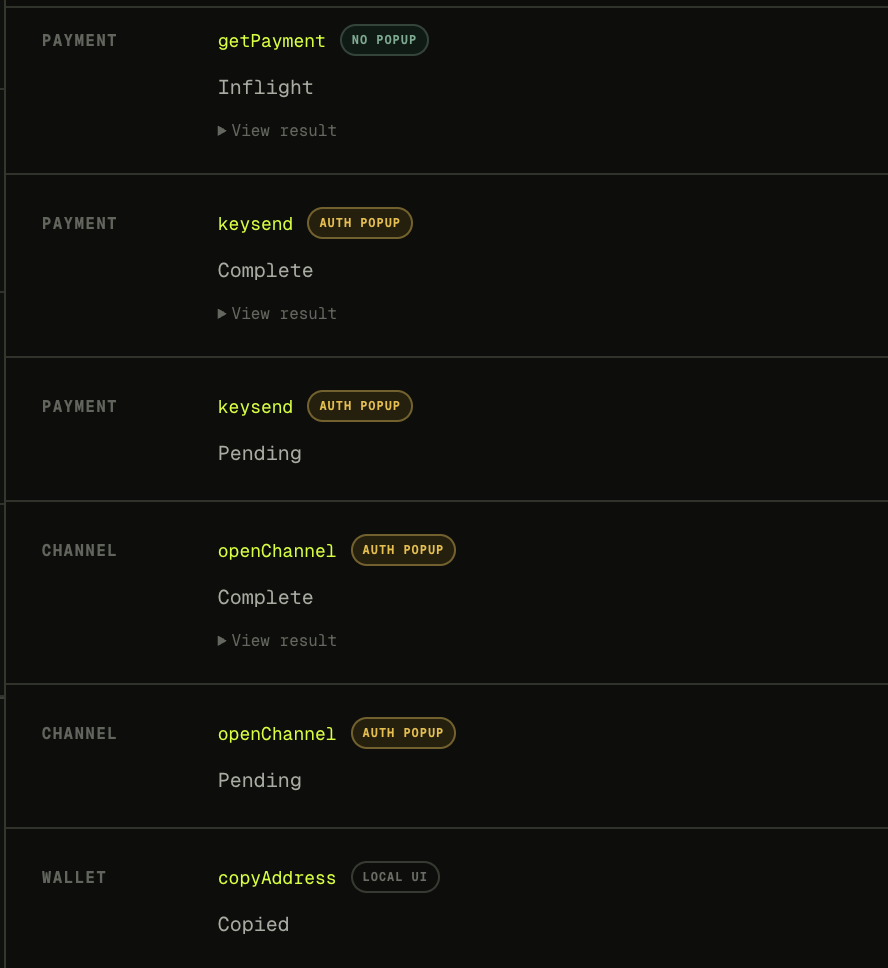
This permission model can become more granular in the future. For example:
- Allow a website to read the balance but not send payments.
- Limit a single payment to 10 CKB.
- Limit total daily payments to 100 CKB.
- Require confirmation every time a channel is opened.
- Let trusted websites spend within a predefined allowance.
- Let the user revoke a website’s permission at any time.
The exact policy may evolve, but the basic principle should remain:
Reading state and moving funds should not have the same permission level.
Switch Providers Without Rewriting the DApp
This is the point I most wanted the demo to communicate.
When the user switches from Embedded WASM to Remote fnn, the provider theme, state, and runtime all change.
The DApp’s business logic does not:
const fiber = await requestProvider();

await fiber.enable();

const info = await fiber.getInfo();

await fiber.openChannel({
  peerId,
  fundingAmount,
});

await fiber.keysend({
  destination: peerId,
  amount,
});
From the website’s perspective, it is simply using Fiber capabilities.
Whether the node runs inside the browser, on the user’s computer, or on a server operated by the user should not be a problem that every DApp has to solve again.
                     ┌── Embedded WASM
Web Page → ckbfiber ─┤
                     └── Remote fnn
This is similar to the value WebLN provides in the Lightning ecosystem.
The application depends on a standard interface, not on one specific wallet implementation.
Boundaries I Care About Today
This project is still at an early experimental stage, and several boundaries need to be stated clearly.
First, it is currently focused on CKB Testnet.
Second, the Embedded WASM account lifecycle is not complete.
Account import, export, backup, and recovery still need further design. Encrypting keys in browser-local storage should not be treated as equivalent to production-wallet-level security.
Third, Remote fnn security depends on how the node itself is deployed.
If the administrative RPC interface is exposed directly to the public internet, no browser-extension warning or confirmation dialog can replace server-side authentication and network isolation.
Fourth, the current permission policy is still simple.
Future versions should consider website-level permissions, method-level permissions, payment limits, expiration, and revocation.
Fifth, Fiber WebLN is still an experimental interface.
It borrows the provider model from Lightning WebLN, but it is not yet a broadly discussed or adopted standard. Method names, parameter structures, and the error model may continue to change.
For now, I think it is more important to test the following questions with a working demo than to immediately call it a standard:
- Do Fiber DApps actually need a unified provider?
- Which operations should require authorization?
- Can two different node implementations share the same API?
- Can users understand which provider they are currently using?
- Can Fiber payments feel natural inside the browser?
Final Thoughts
My biggest takeaway from building this demo is that Fiber Network already provides channels and payments, but bringing those capabilities safely into web applications requires a browser-oriented permission model.
An SDK can reduce a dozen low-level calls to one method.
But it does not automatically answer:
- Is the website allowed to call this method?
- Can the user see the amount before approving a payment?
- Where should private keys be stored?
- Can the same DApp switch between different node implementations?
- How does the user revoke a website’s permission?
- How should a remote node be connected securely?
WebLN in the Lightning Network gave me a valuable reference point.
It made me realize that the most important part of a web-facing payment interface is not only making calls simpler. It is deciding:
What may a website request, and who makes the final decision?
Fiber WebLN is my attempt to explore that question.
It is not yet a production wallet or a final standard.
For now, it is a working protocol experiment: two completely different providers, one web page, one shared API, and a real Testnet openChannel plus keysend payment loop.
If you are developing a Fiber DApp, building a browser wallet, or operating your own fnn node, I would be glad to hear which parts of the interface make sense and which do not.
GitHub:
https://github.com/HappySonnyDev/fiber-WebLn
WebPage:
I would also like to leave one question open:
When Fiber payments truly enter the web, what should a website be allowed to do—and what should a website never be allowed to control directly?