Milestone 2 complete: Wallet, Peers & Channels are live
Hi everyone,
Following up on the Milestone 1 update — Milestone 2 is done.
Since that post, the Wallet, Channels, and Network sections moved from placeholders to fully wired screens backed by the official fnn node. This update covers everything shipped from late June through v0.1.7
What M2 set out to do
M2 was about making Fiber usable end-to-end without JSON-RPC literacy:
- Wallet — send and receive with human-readable CKB amounts
- Invoice management — create, track, inspect, and cancel unpaid invoices
- Peer management — connect to public relays and custom peers
- Channels — open, list, and monitor channels through pending → ready states
- Network — connectivity surfaced outside setup, plus a lightweight graph explorer
What you can do today
Download and install
Pre-release builds remain on GitHub for macOS, Windows, and Linux (Apple Silicon and Intel Macs, Linux x64 and ARM64):
Releases · chukwuma619/fiber-studio · GitHub
Latest tag: v0.1.7. These are still unsigned dev builds (Apple/Windows code signing and notarization are planned for M3). The README install guide covers first-launch warnings on macOS and Windows.
End-to-end payment test (testnet verified)
Beyond wiring the UI to fnn, we ran a full off-chain payment on testnet through Fiber Studio — create invoice → pay → confirm settled. It worked.
| Field | Value |
|---|---|
| Network | Testnet |
| Amount | 30 CKB (sent off-chain via Fiber) |
| Fee | 0.03 CKB |
| Invoice note | payment for test |
| Payment hash | 0x87570729fd66eebe76a8cf51dcf80047a1fd69eb363c7f7adc448872943bc1b8 |
| Result | Payment sent successfully; invoice status Paid — “Payment settled on the Fiber network” |
Screenshots:
-
Payment sent — confirmation modal showing “30 CKB sent off-chain via Fiber”, Success badge, fee 0.03 CKB
-
Invoice paid — invoice details modal showing Amount 30 CKB, Status Paid, payment hash visible
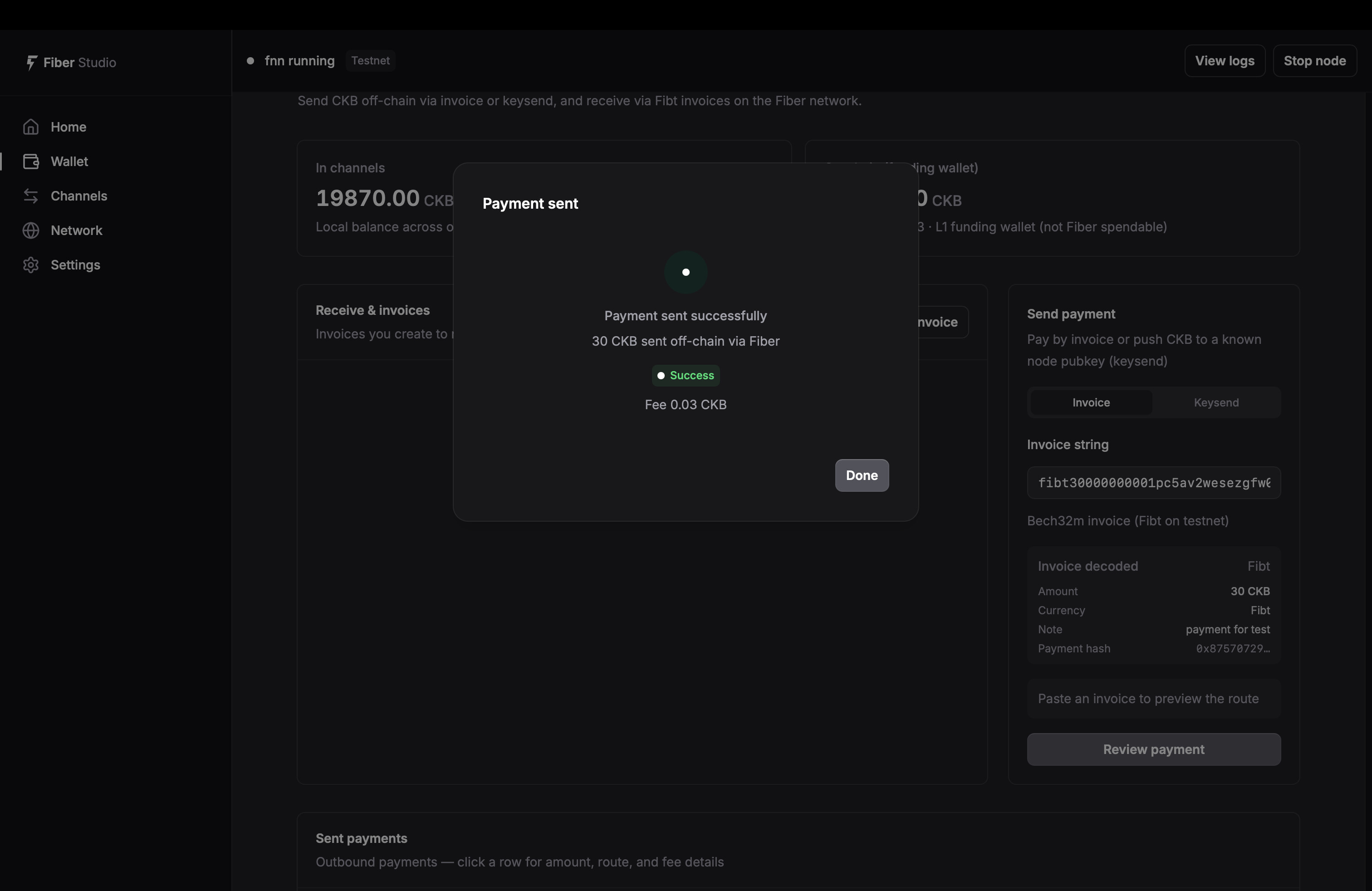
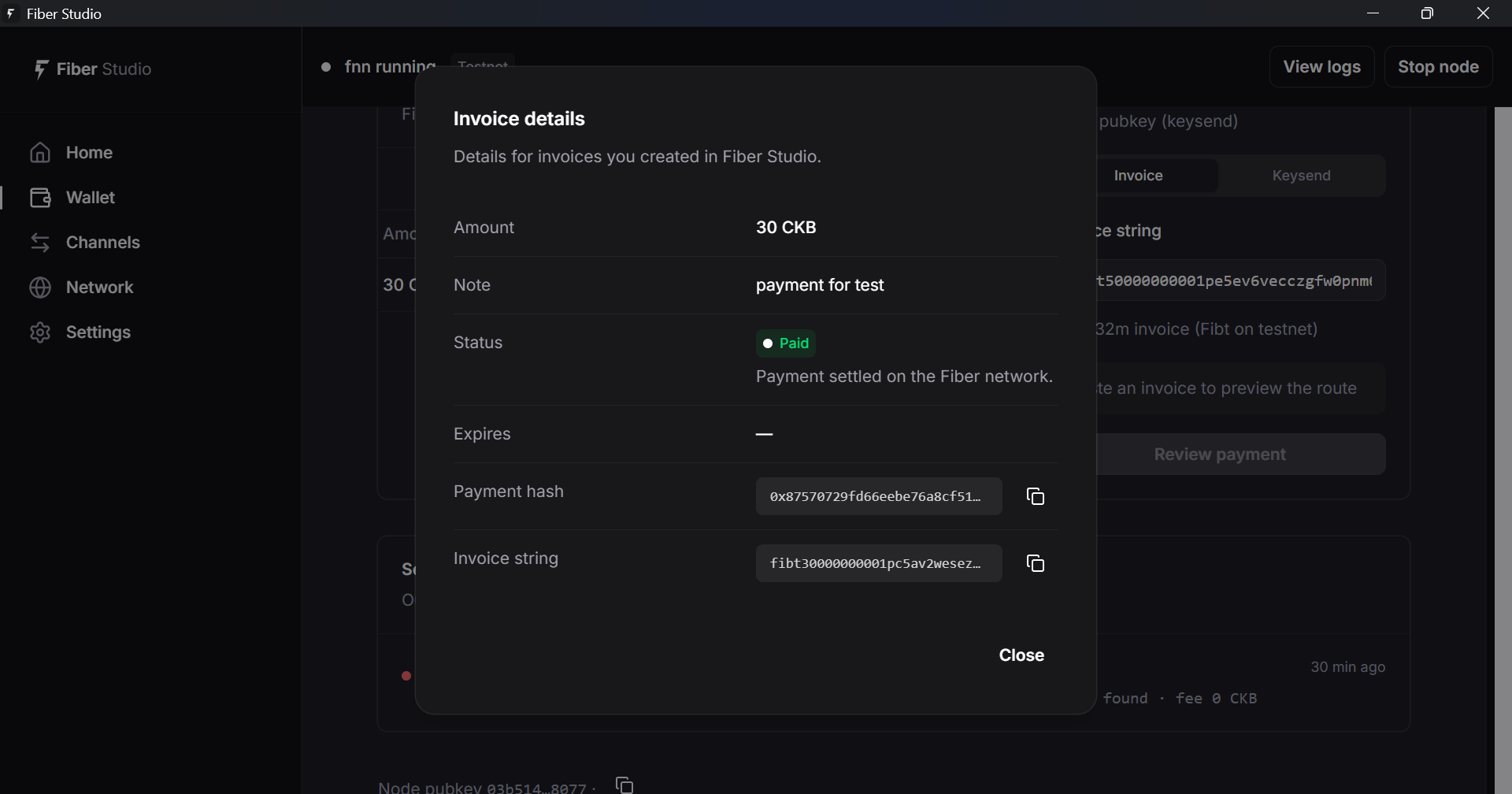
This is the concrete E2E proof behind the grant checklist’s “setup → relay → channel → pay/receive” row — not just that the screens exist, but that money moved off-chain and the invoice settled.
Wallet — send, receive, and track payments
The Wallet tab is now a merged send/receive workspace:
- Create invoice — amount in CKB (not raw shannons), optional expiry and note, QR code + copyable Bech32m string
- Import invoice — add an external invoice to your local list by payment hash
- Invoice list — filter by Active / Paid / All; inspect status, amount, and payment details (cancelled invoices appear under All)
- Cancel unpaid invoices — via
cancel_invoice(the app stores payment hashes locally becausefnnhas nolist_invoices) - Send payment — invoice tab with parse-and-preview before confirm (amount, payee, route preview)
- Keysend — direct pubkey payments with route preview
- Payment history — sent payments with status, fees, route hops, and paginated “load more”
- Relay routing warning — surfaced when your saved peer is not connected, so failed routes are easier to diagnose
Amounts throughout the wallet use human-readable CKB formatting. Home Recent activity also shows incoming invoices alongside payments.
Channels — open, monitor, close, and recover
The Channels tab covers the full channel lifecycle:
- Open channel — pick from saved/connected peers; funding validation against on-chain balance and minimum capacity
- Channel list — state badges for Opening → Awaiting signatures → Ready → Closing (plus failure/shutdown states where applicable)
- Liquidity bars — local vs remote balance on ready channels
- Channel detail — copy peer pubkey and channel ID; view capacity and state
- Close channel — cooperative shutdown for active channels
- Abandon channel — recover from stuck pending/failed opens
- On-chain wallet balance — shown on the channels page for funding decisions
- Refresh — manual reload with loading indicators (skeletons on initial load, spinners on refresh)
Testnet relay nodes in shared/relays.json include multiaddrs so channel opens can target documented testnet hubs directly.
Network — peers, relays, and graph browser
The Network tab is where connectivity lives after first-run setup:
- Saved peers — add by pubkey + multiaddr, connect, and remove
- One-click relay connect — official testnet relays from setup or Add saved peer
- Connected peers — live
list_peersview with bootnode/relay badges - Discovery connections — bootnodes shown separately (connect for gossip, not for opening payment channels); disconnect applies here, not to saved peers
- Status summary — relay connectivity, saved-peer counts, gossip graph sync state
- Gossip graph browser — paginated Nodes and Channels tables from
graph_nodes/graph_channels(lightweight browse, not a block-explorer-style map)
Peer connection logic was hardened across this milestone: connection delays, graph-based address lookup when only a pubkey is known, P2P suffix normalization, and clearer error messages when saved peers fail to connect.
Settings and setup improvements (beyond the M2 checklist)
While building M2, several supporting pieces landed that make the app easier to run day-to-day:
- Settings page — network switch (testnet; mainnet shown as coming soon), wallet password change, per-network data directories, open config/data folder, appearance (light/dark/system)
- Legacy data migration — automatic move from the old
~/fiber-studiolayout to network-specific directories on first launch - Setup wizard hardening — per-step validation, password confirmation, normalized private key input, clearer copy on every step
- Unified error banners — consistent dismiss/retry feedback across Home, Wallet, Channels, and Network
- Node-empty states — contextual guidance when the node is stopped or RPC is unavailable (instead of blank tables)
- In-app updates — still active from M1 (check on launch + Settings); version bump script and publish workflow refined through v0.1.7
Node start/stop lives in the app header (visible on every page). View logs is available from Home and the header. Settings covers node configuration — config/data paths, wallet password, network switch — rather than a dedicated “Node” tab from the original proposal.
Technical / architecture notes
Under the hood, M2 added a substantial Rust command layer on top of the validated Tauri shell from M1:
| Area | What changed |
|---|---|
| Backend commands | New wallet, network, and settings modules (~2,000+ lines) wrapping fnn JSON-RPC |
| Invoice storage | Local invoice index + live get_invoice refresh (no upstream list API) |
| Payments | list_payments pagination, hex-timestamp compatibility for fnn 0.8.1, route/fee display helpers |
| Peers | Saved-peer persistence, bootnode detection, async connect with retry |
| Data layout | Network-specific data directories with legacy migration |
| Frontend data layer | Page-level caching, cache invalidation on mutations, loading skeletons, poll-in-flight guards |
| CI / releases | Consolidated publish workflow, version:bump script, frozen lockfile installs, cross-compilation targets |
| Bundled node | Official fnn v0.8.1 (unchanged pin from M1) |
Rough scale of this milestone: 60 commits, 134 files changed since the M1 release
How this maps to the grant
| M2 goal | Status |
|---|---|
| Wallet — merged Send + Receive, human-readable CKB, invoice QR | Done |
| Invoice management — local list, inspect, cancel unpaid | Done |
Peer management — list_peers, one-click public relays |
Done (+ saved peers, remove, bootnode awareness) |
| Channels — open, list, monitor, pending → ready | Done (+ close, abandon, on-chain balance) |
| Network tab — connect flow surfaced post-setup | Done |
Network graph explorer — graph_nodes / graph_channels |
Done (paginated table view) |
| Dev builds on GitHub for testers | Done — v0.1.3 → v0.1.7 |
| E2E testnet: setup → relay → channel → pay/receive | Verified — 30 CKB off-chain payment on testnet; hash 0x87570729fd66eebe76a8cf51dcf80047a1fd69eb363c7f7adc448872943bc1b8; invoice settled (Paid) |
| Create invoice → appears in list → inspect/cancel | Verified |
| Graph loads without raw JSON-RPC | Verified |
No protocol fork — official fnn RPC only |
Verified |
What’s working now vs M1
| Screen | M1 (June) | M2 (now) |
|---|---|---|
| Home | Live dashboard | + incoming invoices in recent activity, richer empty/error states |
| Wallet | “Coming soon” | Full send/receive, invoices, QR, payment history |
| Channels | “Coming soon” | Open, monitor, close, abandon, funding validation |
| Network | “Coming soon” | Peers, relays, graph browser, connect/disconnect |
| Settings | Updates only | Node/wallet config, theme, network switch, paths |
Honest status — what’s left for M3
M2 focused on feature-complete app flows on unsigned dev builds. Still planned for Milestone 3 (launch):
- Product launch — final brand, custom domain, marketing website
- Signed distribution — Apple notarization, Windows Authenticode, Linux bundles
- Operations — guided
fnnupgrade wizard, auto-start & system tray, log export, expanded error playbooks - Mainnet — setup wizard still shows mainnet as “coming soon” (testnet is the supported path today)
- v1.0.0 — signed final release + DAO completion report
Some M3-scope items landed early (payment history, invoice parse-preview, and basic in-app updates are already in the app), but tray, upgrade wizard, Apple/Windows code signing, and public launch remain M3 work.
What’s next
M3 is the finish and launch month: cross-platform testing, rebrand, website + custom domain, signing pipeline, and v1.0.0. I’ll post another update when the first M3 beta build (targeting v0.6.0 in the proposal) is ready for wider testing.
Try it and tell us what you think
We’ve already run the full testnet payment flow ourselves (see End-to-end payment test above). If you tested M1, this is a good time to repeat it on your machine:
- Fresh install → guided setup → node running
- Network → connect a public relay
- Channels → open a channel → wait for ChannelReady
- Wallet → create invoice → pay from a second node (or keysend)
- Network → browse gossip nodes/channels
Please share feedback here on Nervos Talk or open an issue on GitHub:
- Does the Wallet send/receive flow make sense?
- Is peer connection reliable on your network/OS?
- Any confusion around channels vs peers (especially for multi-hop via a hub)?
The README now includes detailed Option A (direct) and Option B (multi-hop via hub) transaction guides if you want step-by-step checklists.
For those participating in the hackathon, feel free to use this when testing your projects (sending/receiving), without having to run any more terminal code 
GM everyone